1
Install
Docker Compose, Helm, or Terraform, on your own infrastructure.
2
Load the licence
One signed file, checked once at start-up.
3
Sign in as the first admin
Bootstrap secret or bootstrap admin user.
4
Connect identity
Local users, Entra ID / OIDC, SAML, or SCIM.
5
Issue API tokens
sk_ tokens for developers and CI, in local auth mode.6
Publish the evidence key
Give auditors the public key they verify against.
7
Set who approves intakes
How many approvers a new agent needs, and whether one person may approve their own.
1. Install
Every install needs PostgreSQL. It holds the signed records and all configuration. The API image also serves the Console at/console on port
8080.
- Docker Compose
- Helm
- Terraform
For a single host. The compose file runs The compose defaults are development secrets. Override every
postgres and sengol-api.SENGOL_* secret and POSTGRES_PASSWORD in .env before the host is shared.
The compose file sets SENGOL_ALLOW_OWNER_RUNTIME_ROLE=1, so the API runs as
the role that owns the tables. That is for development only.Settings every install needs
Today every shipped install path signs with the local backend: the HMAC key
lives in the process environment. Treat
SENGOL_SIGNING_KEY as you would a
database master key.
2. Load the licence
The licence is a signed file, verified offline when the API process starts. There are no per-feature checks and no calls home.Get a licence
You do not need a licence to try Sengol on a laptop: the quickstart runs on the built-indev licence. A real install
needs a licence file from Sengol.
- Request a pilot at sengol.io/signup with your name, work email and company, and choose Run it yourself. Personal webmail addresses are not accepted, and a pilot is one per company domain.
- Sengol follows up by email. A pilot is arranged with Sengol after the request; it is not self-serve. If the form cannot reach Sengol it opens an email draft to trial@sengol.io. Send it to complete the request.
- You receive a licence file. A pilot licence runs 14 days with the full capability set, nothing gated or metered, and trial licences get no grace period.
- Put the file in place as below, then start the appliance. A renewal takes effect on the next start, so restart after replacing the file.
Check what a process will see:
dev licence, which is fine to inspect:
3. Sign in as the first admin
Use one of two bootstrap paths:- Bootstrap admin user (local sign-in): set
SENGOL_BOOTSTRAP_ADMIN_EMAILand, optionally,SENGOL_BOOTSTRAP_ADMIN_PASSWORD. If you leave the password out, one is generated and printed once in the API log. The user must change it at first sign-in. - Bootstrap secret: set
SENGOL_CONSOLE_ADMIN_SECRETand exchange it for a one-hour admin token. This works whatever the identity mode, so it is also your way in if the IdP is down.
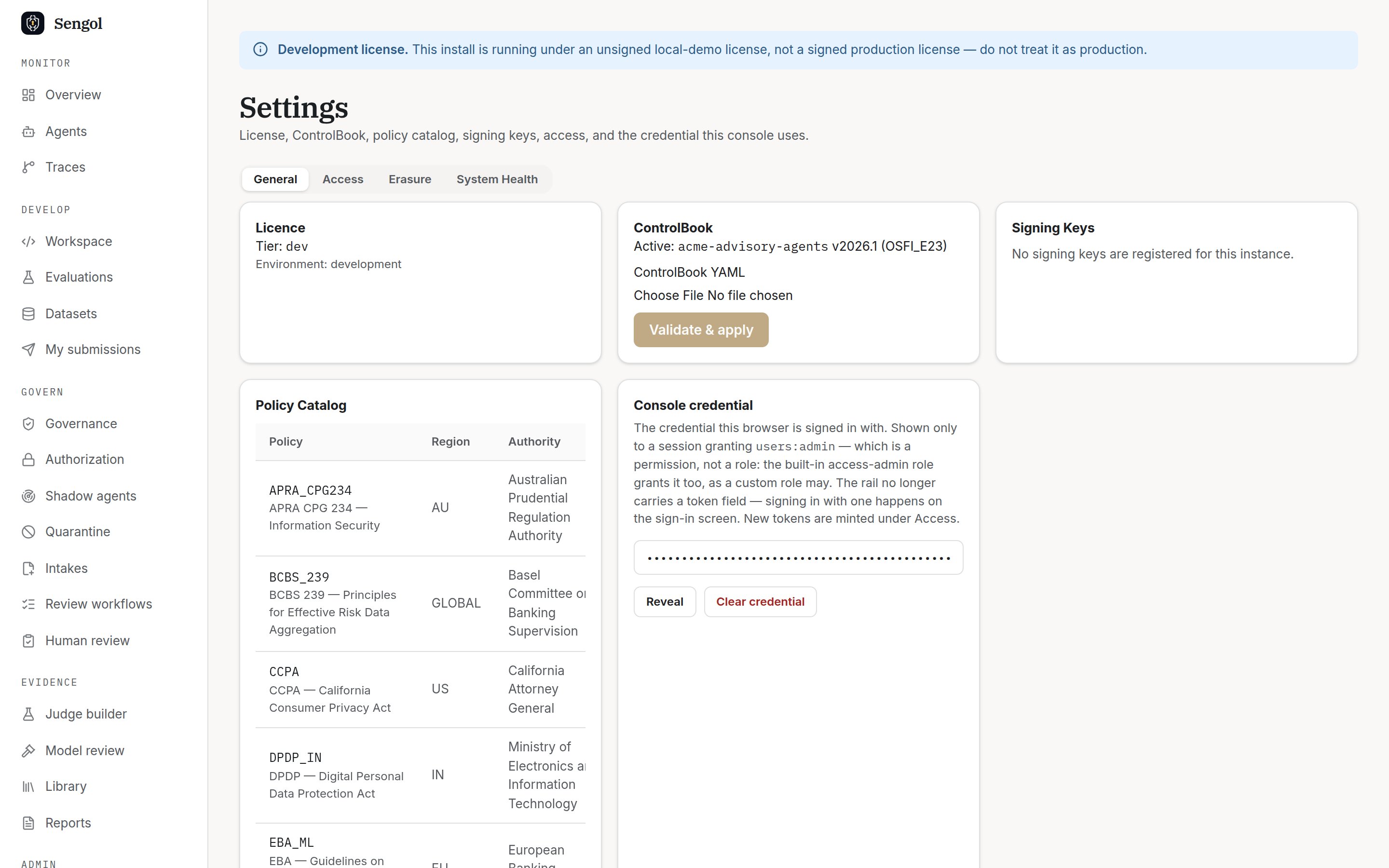
Settings → General: licence tier, active ControlBook, policy catalog.
4. Connect identity
The sign-in mode is chosen once, at start-up: OIDC ifSENGOL_OIDC_PROVIDER_URL is set, else SAML if SENGOL_SAML_* is set,
else local.
Local users
Create a user with a role: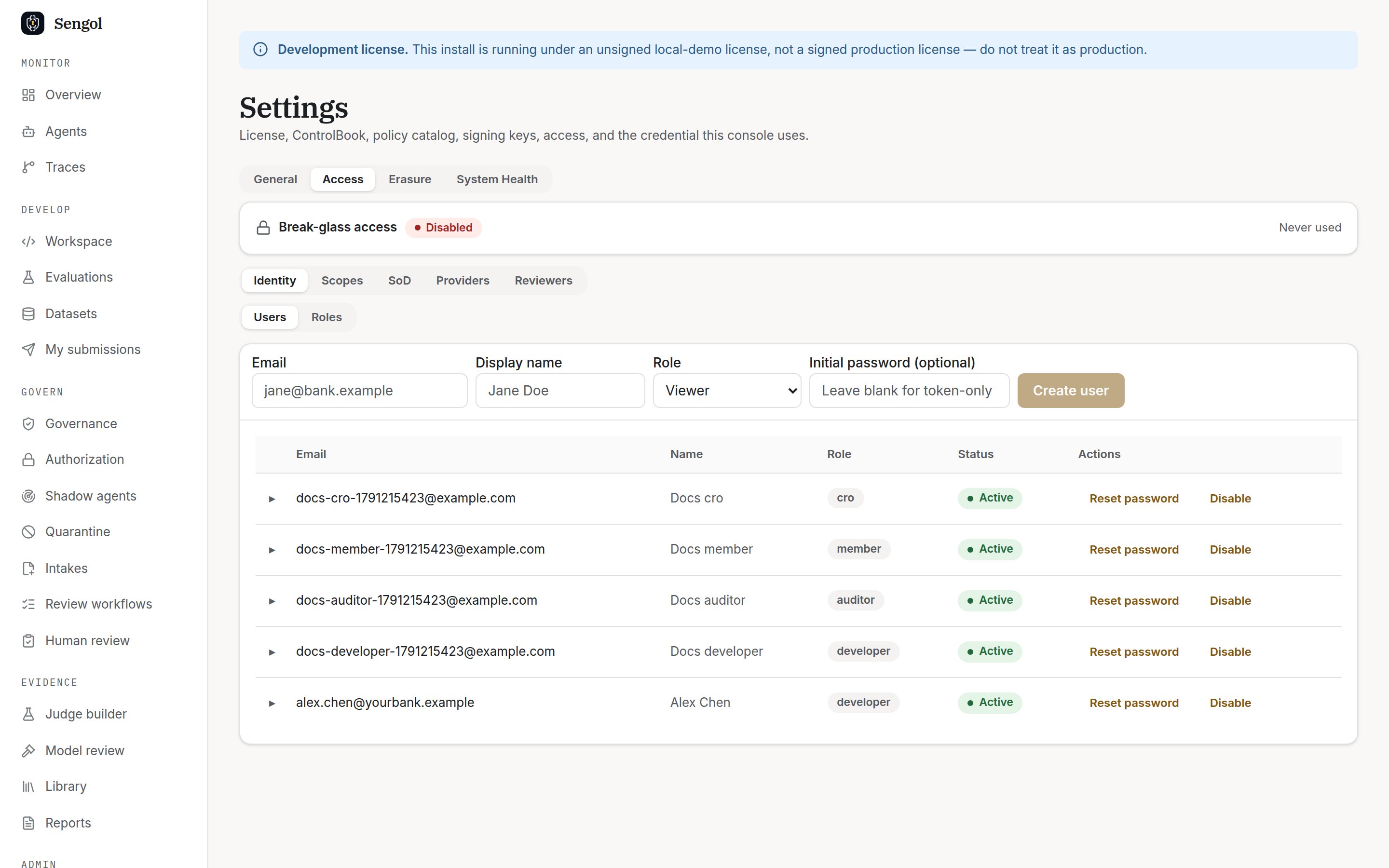
Settings → Access: create users, assign roles, see break-glass status.
- A password is optional. Without one, the user can still get an
sk_token. - TOTP is available but not enforced. Each user enrols from their own account.
- You cannot grant a role with permissions you do not hold yourself.
Entra ID or another OIDC provider
Register an application in your IdP, define app roles such assengol.admin and sengol.auditor, then set:
priority wins
when a user matches several:
viewer (change it with
SENGOL_OIDC_DEFAULT_ROLE).
The Docker Compose file does not forward
SENGOL_OIDC_* variables. Add
them to the sengol-api service’s environment block.SCIM provisioning
Mint a SCIM bearer token and paste thetoken value into your IdP’s
provisioning settings. It is shown once and works only on /scim/v2/*:
https://<your-host>/scim/v2.
Which role for whom
Every permission is listed in Access governance.
5. Issue API tokens
sk_ tokens exist only in local auth mode. Minting one on an install that
signs people in through an IdP returns 503; see
Credentials by journey.
Developers and CI jobs use an sk_ token. Mint one for a user. It is shown
once and expires after 30 days by default:
6. Publish the evidence key
Auditors verify countersignatures against your appliance’s Ed25519 public key. They should get it from you, not from the evidence pack. The key list is public:7. Set who approves intakes
A new agent is registered when an approver approves its intake. Out of the box one person is enough, and that person may be the one who submitted it. Approving needs an interactive sign-in: a password, SSO, orsengol login --device approved in the Console. The bootstrap-secret token in step 3
cannot approve, so use one of those.
Set the rule per risk tier. required_approvals counts the person who
approves. same_actor_rule is allow (the default), reason or block.
You need sod:override, which admin, approver and cro hold.
HIGH intake needs two different approvers, and the submitter cannot
be one. Read the settings back:
Day-two checks
GET /healthreturns{"status":"ok",...}.- The Console’s Settings → System Health tab shows component status.
- Back up PostgreSQL. It holds every record and every setting.